AiTiktok Studio · Nano Banana alternative
A Nano Banana Alternative: Edit Photos with One Sentence
Nano Banana, Google’s image model in the Gemini app, made one-sentence photo edits popular. Edit mode in AiTiktok Studio works the same simple way: upload a photo, write what to change and get the edited picture back. Then go further: change the pose, remove the background or turn the picture into a video with sound.
Free to try · No card needed
Before and after
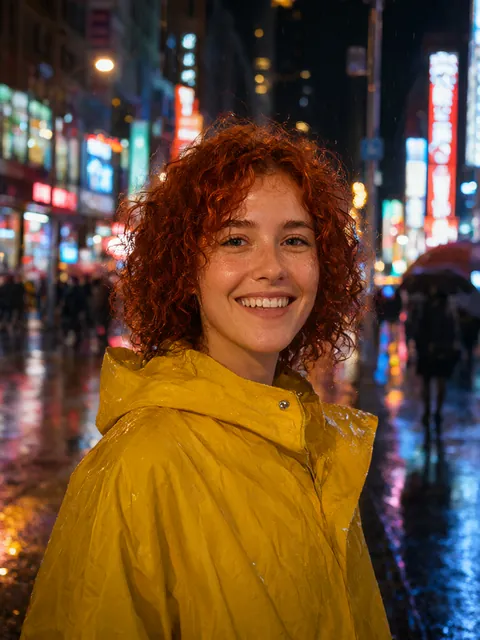
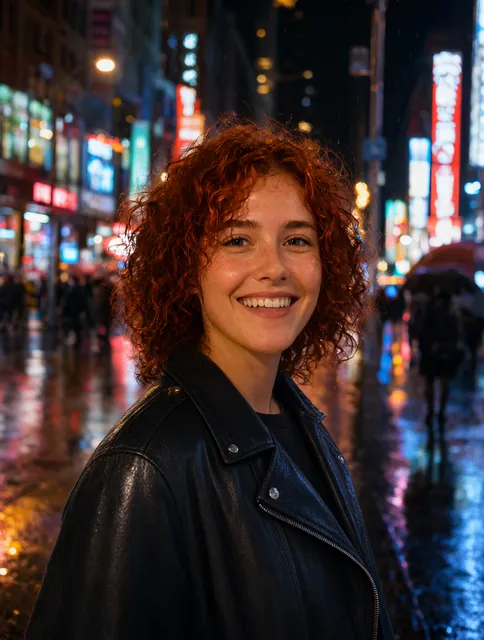
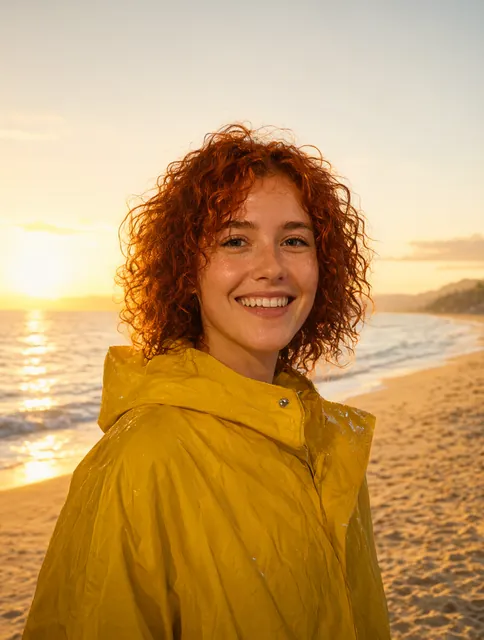
One original picture and two edits, each made with one sentence in Edit mode.
What you can change
Clothes and colors
Change an outfit, a color or a fabric and keep the person the same.
Background and place
Move the scene to a beach, a studio or a city at night with one sentence.
Objects
Add, remove or replace things in the picture.
Pose
Pick a pose from the pose list or describe it. See the AI pose changer.
Transparent background
Cut out the subject for a sticker or a product photo. See the background remover.
Photo to video
Turn the edited picture into a short vertical video with sound. See image to video.
How to edit a photo with one sentence
- Sign in and open the Studio. It runs in the browser on a phone or a computer.
- Choose Edit and upload your photo. Use a picture you have the right to use.
- Write one change. For example: “Change her yellow raincoat to a black leather jacket.”
- Create and download. The edited picture appears in your history. Download it, or keep editing.
Tips for better edits
Ask for one change at a time. “Change the jacket to black leather” works better than one sentence that changes the clothes, the place and the light at once. Name what should stay the same when it matters, for example “keep her face and hair.” Clear, well-lit photos give the cleanest results, and when an edit is close but not right, change one word and try again.
Edits build on each other: change the outfit first, then the background, then the pose, and keep each version in your history in case you want to go back.
From a picture to a TikTok video
A photo edit is often the first step of a post, not the last. Once the picture looks right, open it in image to video, describe how it should move and get a vertical clip with sound. With Character Swap you can also put the person from your picture into a real video you filmed.
Free to try, more with the Studio plan
Edit mode is free to try with a signed-in account, and no card is needed. The Studio plan adds unlimited videos, Character Swap and extra engines; new members get 7 days free, then $19.50 for the first month and $39/month after that.
Questions and answers
Is AiTiktok Studio made by Google?
No. AiTiktok Studio is an independent service and is not affiliated with Google. Nano Banana and Gemini are trademarks of Google.
Is the photo editor free?
Edit mode is free to try with a signed-in account, and no card is needed.
What can I change in a photo?
Clothes, colors, objects, the background and the pose, each with one sentence.
Can I turn the edited photo into a video?
Yes. Use image to video: describe the movement, and the video starts on your picture, with sound.
Do I need to install an app?
No. AiTiktok Studio runs in the browser on a phone or a computer.
Edit your first photo
Sign in, upload a photo and write one sentence. Free to try, with no card needed.
Related: the AI photo editor, the AI pose changer, the AI image generator, image to video and all alternatives.
Nano Banana and Gemini are trademarks of Google. AiTiktok Studio is not affiliated with, endorsed by or sponsored by Google.